> ## Documentation Index
> Fetch the complete documentation index at: https://semgrep-ee9d73d8-mintlify-b75b9a88.mintlify.site/llms.txt
> Use this file to discover all available pages before exploring further.
# Core deployment
> Semgrep can be set up to scan repositories of any size.
Once added to Semgrep, a codebase, repository, or subfolder within a monorepo is referred to as a **project**.
**Deployment** refers to the process of integrating Semgrep into your developer and infrastructure workflows. Completing the deployment process provides you with the Semgrep features that meet your security program's needs.
Deployment includes:
* Running Semgrep scanners as part of your CI. These scans can be any combination of SAST (Static Application Security Testing), SCA (Software Composition Analysis), or Secrets, depending on your plan.
* Managing team members' access and authentication.
* Ensuring that Semgrep has sufficient access to your self-hosted source code manager (SCM), such as GitLab Self-Managed.
Semgrep does not require code access to complete the core deployment process. Your code is not sent anywhere.
**ARE THESE GUIDES FOR YOU?**
* These guides outline procedures for the deployment of Semgrep as part of a security program. To try out Semgrep, refer to the [ Quickstart](/getting-started/quickstart) document.
* Individual users can also use these guides to deploy Semgrep as part of their personal security.
Many deployment features are set up through **Semgrep AppSec Platform**.
Deployment does **not** include:
* Customizing your SAST, SCA, or secrets scans
* Custom rule writing
* Triage
For these features, refer to the **Scan and Triage** section in the navigation bar.
### All Semgrep deployment features
Semgrep supports many different technology stacks. Refer to the following table to evaluate which deployment features of Semgrep you can use based on your technologies.
#### Core deployment
These are the absolute minimum Semgrep features for any deployment.
| Deployment feature | Notes |
| :--------------------------------------------------------------------- | :------------------------------------------------------------------------------------------------------------------------------------------------------------------------------------------------------------------------------------------------------------------------------------------------------------------------------------------------------------------------------------------------------------------------- |
| SAST scanning | Check that Semgrep: - Can scan your language and that the language's maturity matches your security needs. See Supported languages.
- Provides rulesets that you can use out-of-the-box. See Semgrep Registry.
|
| SCA scanning | Check that Semgrep either supports your manifest file or lockfile and package manager. |
| Secrets scanning | Check that your services, such as Slack or Twilio, can be validated by Semgrep. Semgrep Secrets is available through Semgrep Sales, so you must Book a demo. |
| SSO | Semgrep supports: - OpenID Connect or OAuth 2
- SAML 2.0
|
| Organizations | Semgrep can connect to orgs from GitHub and GitLab. Connecting an org enables Semgrep AppSec Platform to authenticate new users from the same org easily.
If you use Bitbucket or Azure Repos, you can use SSO to manage the authentication of your users, then add repositories for scanning through your CI provider. |
| Scanning remote repositories through CI | Semgrep fully supports many popular CI providers. See Add Semgrep to CI. |
| Managed Scans: scanning remote repositories in bulk without CI changes | An alternative method of scanning many repositories with Semgrep that doesn't require integration with your CI. Requires read access to user-selected repositories. See Add repositories to Semgrep in bulk. |
| PR or MR comments | Semgrep can post PR or MR comments in the following SCMs: |
#### Additional deployment features
Useful features that you can add based on your tech stack. You can integrate these features further into your security workflows after some initial testing of your core deployment.
| Deployment feature | Notes |
| :--------------------------------- | :----------------------------------------------------------------------------------------------------------------------------------------------------------------------------------------- |
| Notifications | Semgrep can send notifications through the following channels: |
| AI-assisted triage and remediation | Semgrep can give AI-assisted recommendations on whether a finding is a true or false positive as well as suggest code fixes for true positive findings. |
| IDE integration | Encourage developers to run Semgrep in their IDE. Officially supported extensions include: - Microsoft Visual Studio Code
- IntelliJ Ultimate IDEA
- Emacs
|
| API | Check that Semgrep's API meets your needs. See API docs. |
## Core deployment process
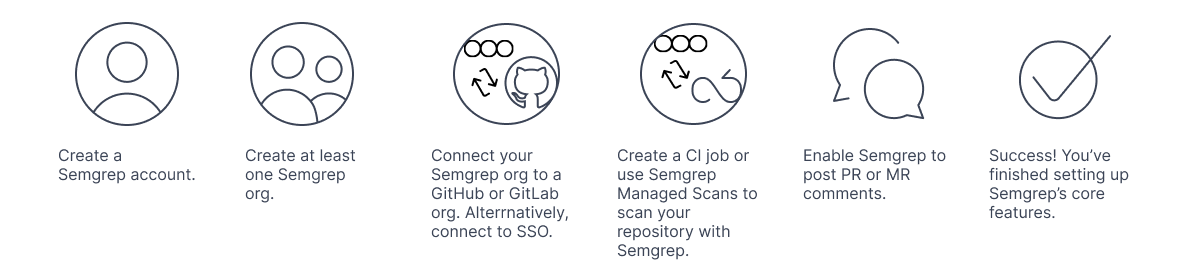
At the minimum, your deployment of Semgrep consists of the following steps:
Each user of Semgrep has one account.
Each Semgrep account can have many orgs. Orgs are logical groupings of related projects and users.
* For GitHub or GitLab users, you can connect your Semgrep org to the orgs in your source code manager (SCM). This means that any member of an org in your SCM can sign in to your Semgrep deployment.
* You can also use SSO to manage user authentication.
This step ensures that your Semgrep deployment is up and running and that you receive **findings** of security issues in Semgrep AppSec Platform.
 To manage a large volume of users and projects, you may need to perform additional steps:
* Role management
* Tagging projects
These steps are covered in the section [Deployment at scale](/category/deployment-at-scale).
Team size isn't necessarily indicative of deployment needs. Features for large teams can be deployed for smaller teams as well, and are available on the Semgrep Team Tier.
## Deploy Semgrep in phases
It is recommended to finish the core deployment of Semgrep to a few repositories or departments in your organization first before attempting to deploy to the majority.
This **initial phase** prepares you to deploy Semgrep to the rest of the organization. Organizational infrastructure can vary greatly and the initial deployment can help you identify and address issues so that they do not recur in a wider deployment.
## Next steps
Click **Next** to begin setting up your core deployment.
To manage a large volume of users and projects, you may need to perform additional steps:
* Role management
* Tagging projects
These steps are covered in the section [Deployment at scale](/category/deployment-at-scale).
Team size isn't necessarily indicative of deployment needs. Features for large teams can be deployed for smaller teams as well, and are available on the Semgrep Team Tier.
## Deploy Semgrep in phases
It is recommended to finish the core deployment of Semgrep to a few repositories or departments in your organization first before attempting to deploy to the majority.
This **initial phase** prepares you to deploy Semgrep to the rest of the organization. Organizational infrastructure can vary greatly and the initial deployment can help you identify and address issues so that they do not recur in a wider deployment.
## Next steps
Click **Next** to begin setting up your core deployment.