> ## Documentation Index
> Fetch the complete documentation index at: https://semgrep-ee9d73d8-mintlify-b75b9a88.mintlify.site/llms.txt
> Use this file to discover all available pages before exploring further.
# How Semgrep works
> Semgrep enables you to:
* Search for code semantically
* Codify those search parameters as a **rule**
* Run the rule on every keystroke, commit, pull request, and merge
## `grep`, linters, and Semgrep
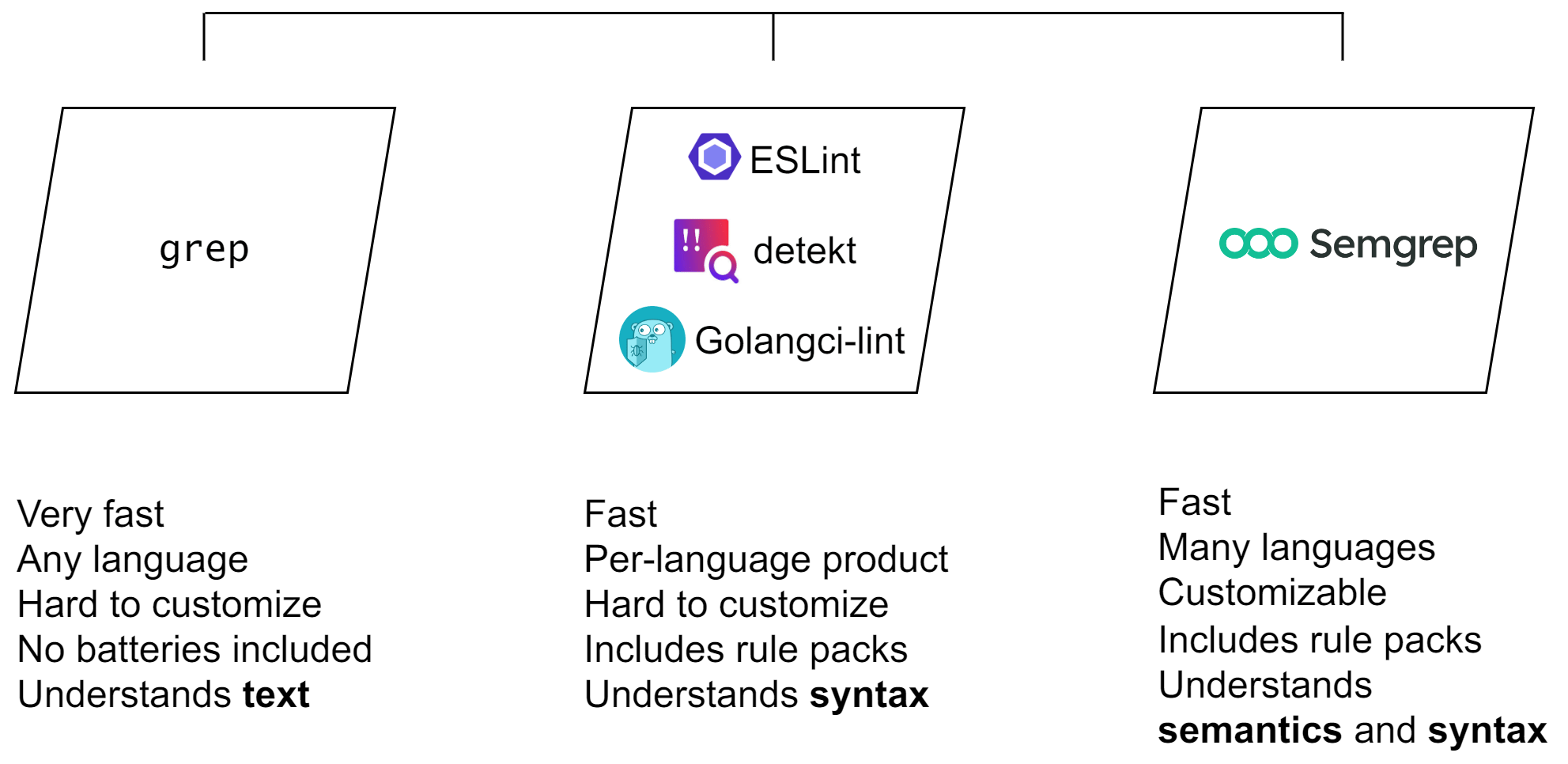 In addition to being a security tool, once customized, Semgrep can be used as a linter to help you and your team codify and follow best practices and to detect code smells.
You only need to learn a single rule-writing schema to write rules for many programming languages, rather than having to learn a new schema for each linter.
## Transparency and determinism
Semgrep is **transparent** because you can inspect the rules and analyses that are run on your code. Rules establish what should match (for example, you may want to look for and ban usages of `==` in JavaScript) and what shouldn't match. They have the following characteristics:
* Rules are written in YAML. By having a single schema for all supported programming languages, you can write rules for any programming language that Semgrep supports.
* In contrast, linters vary in customizability. Linters that let you write your own rules require you to learn that linter's rule schema, which can only be applied to that linter's programming language.
* A rule has a **confidence level** to indicate the likelihood it is a true positive.
* A rule includes a **message** to help you remediate or fix.
Semgrep is **deterministic**; given the same set of inputs, such as your code and rules, and the same analyses, Semgrep always finds the same findings.
## Speed, scope and analysis
Semgrep can perform several types of analyses on a given scope, which affects its scan speed. The following table breaks down expected runtimes in each developer interface.
| Interface | Scope of scan | Analysis | Typical speed |
| :-------------------------------------------------------------- | :------------------------------------------------------------- | :----------------------------------- | :--------------- |
| IDE (per keystroke and on save) | Current file | Single-function, single-file | In a few seconds |
| CLI on commit (through [`pre-commit`](https://pre-commit.com/)) | Files staged for commit (cross-function, single-file analysis) | Cross-function, single-file | Under 5 minutes |
| PR or MR comments | All committed files and changes in the PR or MR | Cross-function, single-file analysis | Under 5 minutes |
### Rule examples
Click the following boxes to learn about Semgrep's pattern matching mechanisms and analyses.
#### Simple syntax-based example
You may want to ban the use of `==` in JavaScript and instead require `===` to avoid **type coercion** when evaluating expressions. This is a common standard enforced in popular JavaScript linters. This is a simple find and replace in many text editors, because the ban is enforced for **all** usages of `==`. In Semgrep, you can create a rule codifying this find and replace operation to share or enforce this standard.
***Figure**. Prevent type coercion in `==`. Click ** Run** to view the findings.*
This simple rule is accurate because it only requires the syntax defined in `pattern` to match, not the semantics. The **metavariables** $A and $B always evaluate to some value on the left and right hand side of the `==` operator, and that is all that matters, not the meaning or of $A and $B themselves.
**METAVARIABLES**
[Metavariables](/writing-rules/pattern-syntax#metavariables) are an abstraction to match code when you don’t know the value or contents ahead of time, similar to capture groups in regular expressions.
#### Complex syntax-based example
It is a common convention either to ban all uses of some language feature in user-facing code, such as `console.log()`, or to permit `console.log()` internally but not externally.
Semgrep enables you to create a custom best practices set of rules around cases like this.
***Figure**. Ban `console.log` in external-facing functions. Click ** Run** to view the findings.*
Notice that only **line 4** matches. This is because only line 4 has a `console.log()` function within `someExternalFunction()`.
This example defines both what matches within the external-facing function, and the external-facing function itself. This is achieved through the use of `pattern` and `pattern-inside`. The `...` **ellipsis** operator tells Semgrep to accept any number of arguments or values in `someExternalFunction()` and `console.log()`, thus capturing all possible variations of the functions.
#### Semantic taint analysis example
A more complex example is detecting if **unsanitized data** is flowing from some **source**, such as saved form data, to a **sink**, without sanitization.
The following example is a simplified Semgrep rule that detects possible cross-site scripting vulnerabilities:
***Figure**. Prevent possible cases of cross-site scripting due to unsanitized data. Click ** Run** to view the findings.*
In this example, **lines 11 and 18** are the only two true positives.
* **Line 7** is not a match because `hash` has been sanitized through `sanitize(hash)`.
* **Line 9** stores the hash as a number, and the rule has defined this as a sanitizer as well.
Semgrep defines the `pattern-sources`, `pattern-sinks`, and `pattern-sanitizers` to make sure that the rule is accurate and contains no false positives or false negatives by including every possible way this type of XSS can occur and **excluding** those cases where the data has been sanitized.
In addition to being a security tool, once customized, Semgrep can be used as a linter to help you and your team codify and follow best practices and to detect code smells.
You only need to learn a single rule-writing schema to write rules for many programming languages, rather than having to learn a new schema for each linter.
## Transparency and determinism
Semgrep is **transparent** because you can inspect the rules and analyses that are run on your code. Rules establish what should match (for example, you may want to look for and ban usages of `==` in JavaScript) and what shouldn't match. They have the following characteristics:
* Rules are written in YAML. By having a single schema for all supported programming languages, you can write rules for any programming language that Semgrep supports.
* In contrast, linters vary in customizability. Linters that let you write your own rules require you to learn that linter's rule schema, which can only be applied to that linter's programming language.
* A rule has a **confidence level** to indicate the likelihood it is a true positive.
* A rule includes a **message** to help you remediate or fix.
Semgrep is **deterministic**; given the same set of inputs, such as your code and rules, and the same analyses, Semgrep always finds the same findings.
## Speed, scope and analysis
Semgrep can perform several types of analyses on a given scope, which affects its scan speed. The following table breaks down expected runtimes in each developer interface.
| Interface | Scope of scan | Analysis | Typical speed |
| :-------------------------------------------------------------- | :------------------------------------------------------------- | :----------------------------------- | :--------------- |
| IDE (per keystroke and on save) | Current file | Single-function, single-file | In a few seconds |
| CLI on commit (through [`pre-commit`](https://pre-commit.com/)) | Files staged for commit (cross-function, single-file analysis) | Cross-function, single-file | Under 5 minutes |
| PR or MR comments | All committed files and changes in the PR or MR | Cross-function, single-file analysis | Under 5 minutes |
### Rule examples
Click the following boxes to learn about Semgrep's pattern matching mechanisms and analyses.
#### Simple syntax-based example
You may want to ban the use of `==` in JavaScript and instead require `===` to avoid **type coercion** when evaluating expressions. This is a common standard enforced in popular JavaScript linters. This is a simple find and replace in many text editors, because the ban is enforced for **all** usages of `==`. In Semgrep, you can create a rule codifying this find and replace operation to share or enforce this standard.
***Figure**. Prevent type coercion in `==`. Click ** Run** to view the findings.*
This simple rule is accurate because it only requires the syntax defined in `pattern` to match, not the semantics. The **metavariables** $A and $B always evaluate to some value on the left and right hand side of the `==` operator, and that is all that matters, not the meaning or of $A and $B themselves.
**METAVARIABLES**
[Metavariables](/writing-rules/pattern-syntax#metavariables) are an abstraction to match code when you don’t know the value or contents ahead of time, similar to capture groups in regular expressions.
#### Complex syntax-based example
It is a common convention either to ban all uses of some language feature in user-facing code, such as `console.log()`, or to permit `console.log()` internally but not externally.
Semgrep enables you to create a custom best practices set of rules around cases like this.
***Figure**. Ban `console.log` in external-facing functions. Click ** Run** to view the findings.*
Notice that only **line 4** matches. This is because only line 4 has a `console.log()` function within `someExternalFunction()`.
This example defines both what matches within the external-facing function, and the external-facing function itself. This is achieved through the use of `pattern` and `pattern-inside`. The `...` **ellipsis** operator tells Semgrep to accept any number of arguments or values in `someExternalFunction()` and `console.log()`, thus capturing all possible variations of the functions.
#### Semantic taint analysis example
A more complex example is detecting if **unsanitized data** is flowing from some **source**, such as saved form data, to a **sink**, without sanitization.
The following example is a simplified Semgrep rule that detects possible cross-site scripting vulnerabilities:
***Figure**. Prevent possible cases of cross-site scripting due to unsanitized data. Click ** Run** to view the findings.*
In this example, **lines 11 and 18** are the only two true positives.
* **Line 7** is not a match because `hash` has been sanitized through `sanitize(hash)`.
* **Line 9** stores the hash as a number, and the rule has defined this as a sanitizer as well.
Semgrep defines the `pattern-sources`, `pattern-sinks`, and `pattern-sanitizers` to make sure that the rule is accurate and contains no false positives or false negatives by including every possible way this type of XSS can occur and **excluding** those cases where the data has been sanitized.