> ## Documentation Index
> Fetch the complete documentation index at: https://semgrep-ee9d73d8-mintlify-b75b9a88.mintlify.site/llms.txt
> Use this file to discover all available pages before exploring further.
# Set up GitHub pull request comments
**YOUR DEPLOYMENT JOURNEY**
* You have gained the necessary [resource access and permissions](/deployment/checklist) required for deployment.
* You have [created a Semgrep account and organization](/deployment/create-account-and-orgs).
* You have [connected your source code manager](/deployment/connect-scm).
* Optionally, you have [set up SSO](/deployment/sso).
* You have successfully added a [Semgrep job](/deployment/add-semgrep-to-ci) to your CI workflow with [diff-aware scanning](/deployment/customize-ci-jobs/#set-up-diff-aware-scans).
Semgrep can create **pull request (PR) comments** in your GitHub repository. These comments provide a description of the issue detected by Semgrep and may offer possible solutions. These comments are a means for security teams, or any team responsible for creating standards to help their fellow developers write safe and standards-compliant code.
Semgrep findings are typically posted in your PR or MR. The following image displays the parts of a Semgrep PR comment in GitHub; this example appears in a similar form in GitLab and other SCMs:
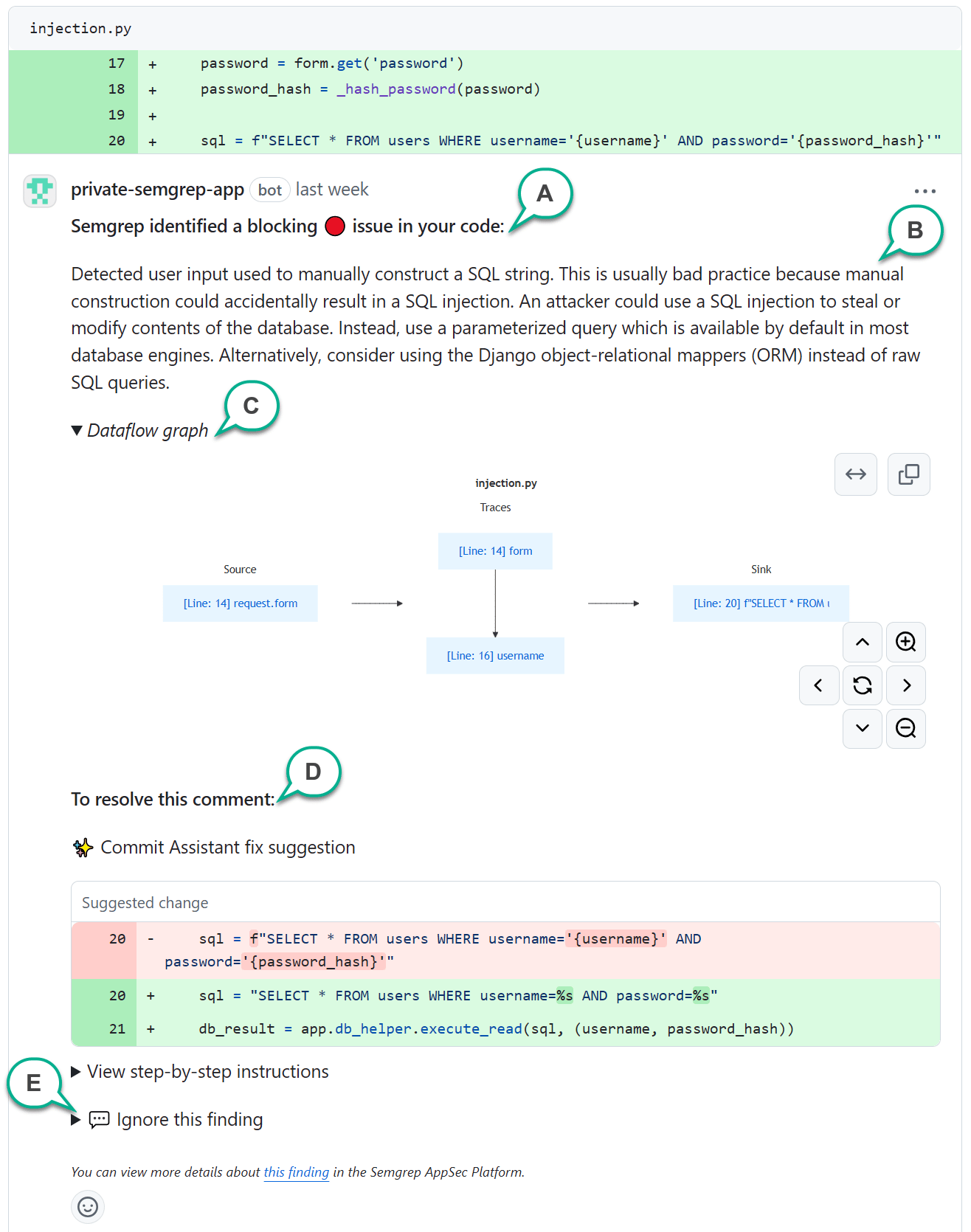 **A - Block indicator**
This appears if a finding fails the CI job. Organizations typically block PRs or MRs with failed jobs.
**B - Finding description**
A human-written description always appears in a PR or MR comment, describing why your code is flagged. **References** may also be included to help you learn more about the finding.
**C - Dataflow graph**
Some Code findings have a dataflow graph, which indicates that the finding was detected through %%taint analysis|taint\_analysis%%. The dataflow graph provides the lines of code identifying sources, sinks, and traces of unsanitized data flowing through your program. You can click the links on the boxes to take you to the lines of code.
**D - Resolution or remediation section**
Various options are provided to help your resolve the finding. Depending on the type of finding, resolution options may vary.
**E - Ignore instructions**
Click to view instructions about how to ignore the finding by replying to the comment.
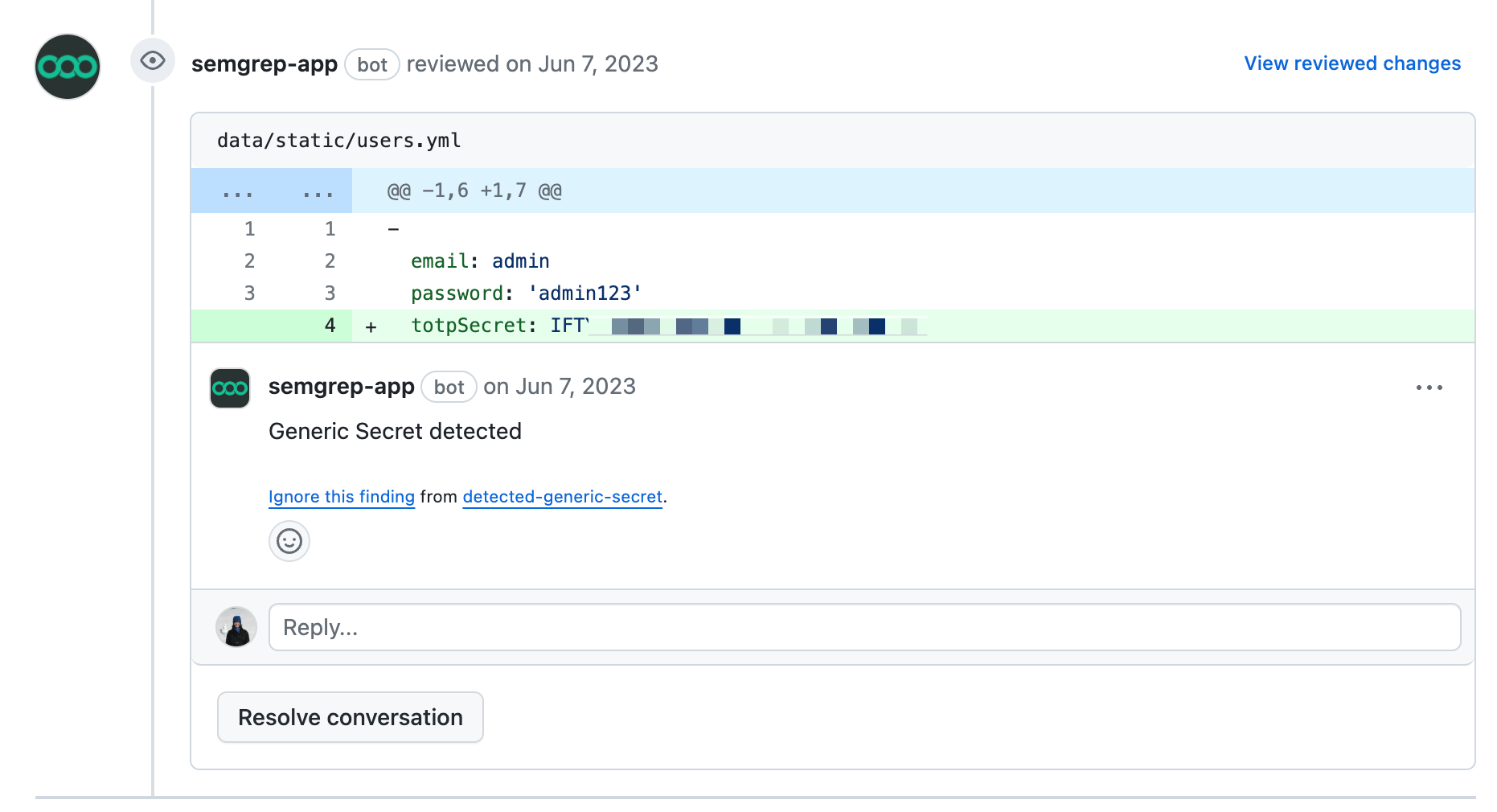
Depending on the features you have enabled, your PR comment can also appear more straightforward:
 ## Conditions for PR comment creation
PR comments appear for the following types of scans under these conditions:
| Type of scan | Product name | Trigger condition | How to set up |
| :----------------------------------------- | :------------------------- | :---------------------------------------------------------------------------------------------------------------------------------------------------------------------------------------------------------------- | :-------------------------------------------------------------------------------------------------------------------------------------------------------------------------------------------------------------------------------------------------------------------------------------------------------------------------------------------------------- |
| Static application security testing (SAST) | Semgrep Code | A comment appears when a finding is generated by a rule in **Comment or Block mode**. This means you can fully customize what comments your developers receive. | Complete the steps in the following sections:
## Conditions for PR comment creation
PR comments appear for the following types of scans under these conditions:
| Type of scan | Product name | Trigger condition | How to set up |
| :----------------------------------------- | :------------------------- | :---------------------------------------------------------------------------------------------------------------------------------------------------------------------------------------------------------------- | :-------------------------------------------------------------------------------------------------------------------------------------------------------------------------------------------------------------------------------------------------------------------------------------------------------------------------------------------------------- |
| Static application security testing (SAST) | Semgrep Code | A comment appears when a finding is generated by a rule in **Comment or Block mode**. This means you can fully customize what comments your developers receive. | Complete the steps in the following sections:
1. [Confirm your Semgrep account's connection and access to your source code manager](#confirm-your-semgrep-accounts-connection).
2. [Configure comments for Semgrep Code](#configure-comments-for-semgrep-code). |
| Software composition analysis (SCA) | Semgrep Supply Chain (SSC) | A comment appears based on the conditions you explicitly set in a [Supply Chain policy](/semgrep-supply-chain/policies) or when Semgrep detects a [license violation](/semgrep-supply-chain/license-compliance). | To receive Supply Chain comments, complete the steps in [Confirm account connection and access](#confirm-your-semgrep-accounts-connection) and [set up a policy](/semgrep-supply-chain/policies).
To receive license violation comments, [enable dependency search](/semgrep-supply-chain/dependency-search#enable-and-use-dependency-search). |
| Secrets | Semgrep Secrets | A comment appears when a finding is generated by a rule in **Comment or Block mode**. A comment also appears for invalid findings and validation errors if these conditions are set to **Comment or Block mode**. | Complete the steps in the following sections:
1.[Confirm your Semgrep account's connection and access to your source code manager](#confirm-your-semgrep-accounts-connection).
2. [Configure comments for Semgrep Secrets](#configure-comments-for-semgrep-secrets). |
Comments from Supply Chain scans include the following information:
**Risk**
A description of the vulnerability, including the types of attack it is vulnerable to.
**Fix**
Indicates what versions to upgrade to, if any, that resolves or eliminates the vulnerability.
**Reference**
A link to additional information about the vulnerability from its source, such as the [GitHub Advisory Database](https://github.com/advisories) and the [National Vulnerability Database (NVD)](https://nvd.nist.gov/vuln), if available.
## Steps to set up PR comments
### Prerequisites
In addition to finishing the previous steps in your deployment journey, it is recommended to have completed a **full scan** on your **default branch** for the repository in which you want to receive comments.
### Confirm your Semgrep account's connection
Confirm that you have the correct connection and access:
In your Semgrep AppSec Platform account, click **Settings > Source code managers**.
Check that an entry for your GitHub org exists and is correct.
### Confirm repository access
Ensure that Semgrep's GitHub app (`semgrep-app`) has sufficient permissions to post PR comments:
Navigate to your `semgrep-app` settings:
i. For personal accounts, navigate to the following URL `https://github.com/settings/installations`.
ii. For organization accounts, navigate to the following URL, substituting YOUR\_ORG\_NAME with the name of your account: `https://github.com/organizations/YOUR_ORG_NAME/settings/installations`.
On the `semgrep-app` row, click **Configure**.
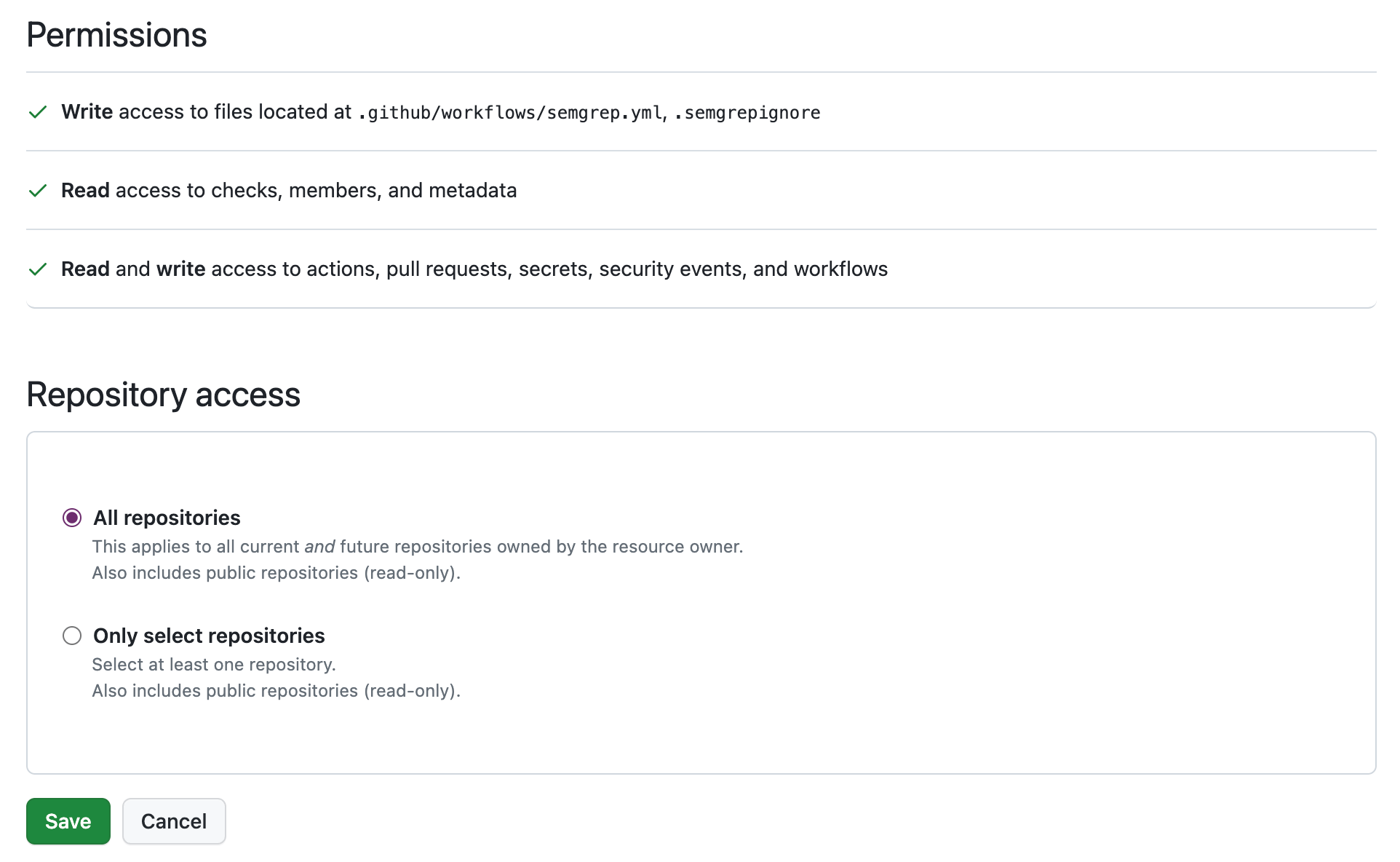
Check that you have granted the following permission: `Read and write access to actions, pull requests, secrets, security events, and workflows`.
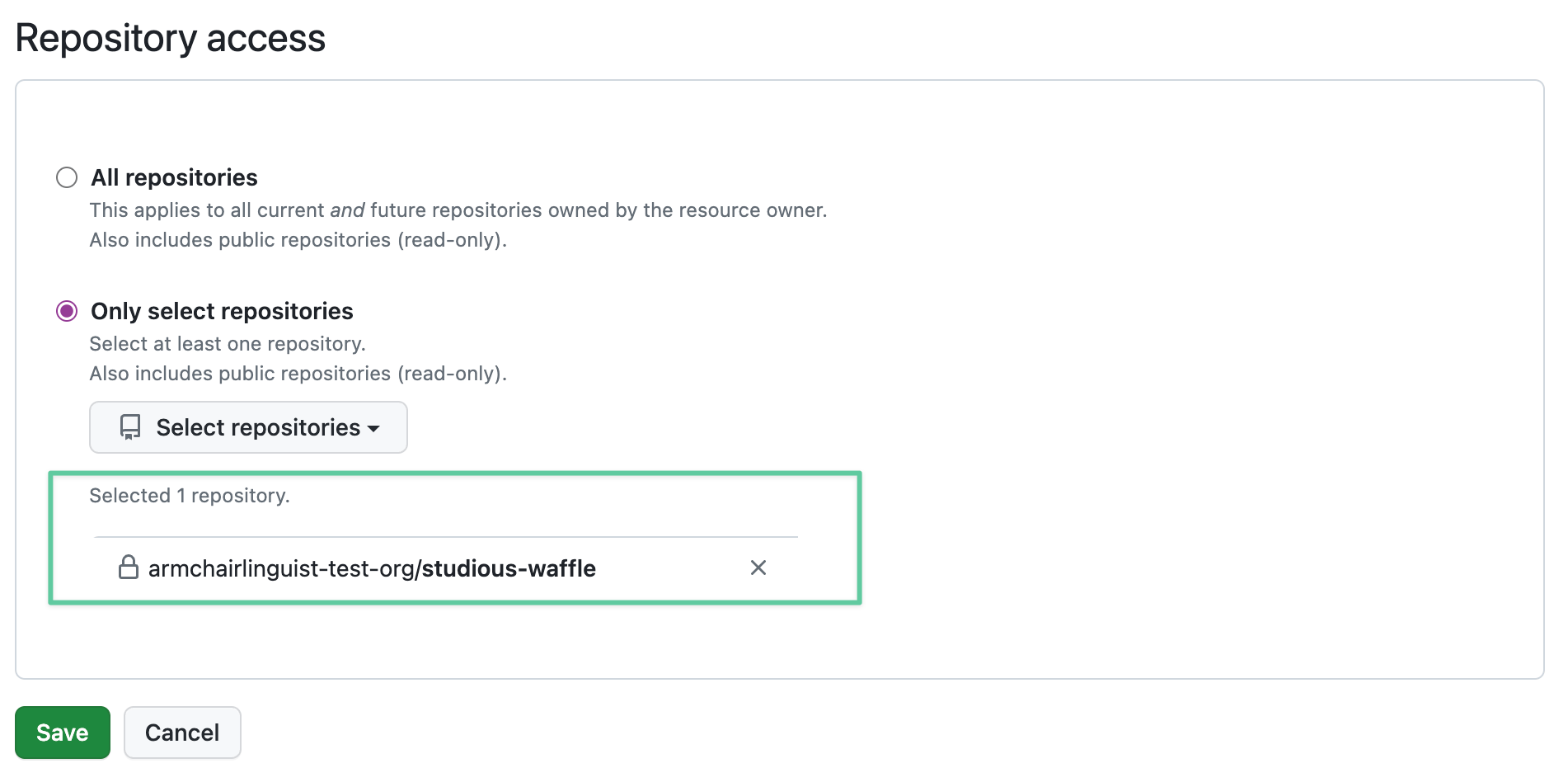
Under **Repository access**, check that you have included the repositories that you added to Semgrep AppSec Platform. Review the following examples:
 For GitHub Actions users, no further steps need to be undertaken. Continue setting up PR comments by configuring comments for Semgrep Code.
### Required environment variables
For CI providers aside from GitHub Actions, additional environment variables must be set:
* SEMGREP\_PR\_ID is set to the PR number of the pull request on GitHub Actions.
* [`SEMGREP_REPO_NAME`](/semgrep-ci/ci-environment-variables/#semgrep_repo_name) is set to the repository name.
* [`SEMGREP_REPO_URL`](/semgrep-ci/ci-environment-variables/#semgrep_repo_url) is set to the repository URL where your project is viewable online.
These values do not have to be fixed or hardcoded. They can be variables passed to the job. For more information, see [ Sample CI configurations](/semgrep-ci/sample-ci-configs).
### Configure comments for Semgrep Code
In addition to setting up the connection between Semgrep and GitHub, you must assign rules to Comment or Block mode. This customization enables you to:
* Manage the amount of PR comments your developers receive.
* Ensure that only rules that meet your criteria, such as high severity or high confidence rules, produce comments visible to developers, reducing noise.
#### Set rules to Comment or Block mode
The following instructions let you customize what findings or security issues your developers see as comments in their PRs:
In your Semgrep AppSec Platform account, click **Rules > Policies** to enter the **Policies** page. Under **Modes **, you can quickly see if you have existing rules in either Comment or Block mode.
Optional: To configure Semgrep Secrets rules, click the **Secrets** tab.
Optional: Use the filters to quickly find rules to set to Comment or Block.
Click the ** checkbox** of the rules you want to set. You can use Ctrl + Click to select rules in bulk.
Click **Change modes**.
Click either **Block** or **Comment**.
You have successfully configured PR comments for Semgrep Code.
**TIP**
Rules in Block mode fail the CI job that runs on the PR. Depending on your workflow, this may prevent your PR from merging.
If you are using **GitHub Actions** to run Semgrep, no extra changes are needed to receive PR comments.
### Configure comments for Semgrep Secrets
In addition to setting up the connection between Semgrep and GitHub, you must assign rules to Comment or Block mode. This customization enables you to:
* Manage the amount of PR comments your developers receive.
* Ensure that only rules that meet your criteria, such as high severity or high confidence rules, and result in findings involving valid secrets produce comments visible to developers, reducing noise.
#### Set rules to Comment or Block mode
The following instructions let you customize what findings or security issues your developers see as comments in their PRs:
In Semgrep AppSec Platform, go to **Rules > Policies > Secrets**.
Under **Modes **, you can see if you have existing rules in either Comment or Block mode. You can also use the filters to find rules you want to set to Comment or Block.
Click the ** checkbox** of the rules you want to set. You can use Ctrl + Click to select rules in bulk.
Click **Change modes**.
Click either **Block** or **Comment**.
You have successfully configured PR comments for Semgrep Secrets.
#### Validation state policies
Validation state policies allow you to define how Semgrep handles the following issues:
* **Invalid findings**: the secret has been revoked, was never functional, or used for a custom or private endpoint that Semgrep can't communicate with. For example, a Semgrep rule that tests GitHub credentials may return an invalid finding if Semgrep can't communicate with an on-premise deployment.
* **Validation errors**: Semgrep was unable to reach the secrets provider to test the validity of the credential, or Semgrep received an unexpected response from the API
To edit the policy for invalid secrets and errors:
In Semgrep AppSec Platform, go to **Rules > Policies > Secrets**.
Click **Validation State Policies**.
Choose the mode, either Comment or Block, that you want Semgrep to set for **Invalid findings**.
Choose the mode, either Comment or Block, that you want Semgrep to set for **Validation errors**.
**TIP**
Rules in Block mode fail the CI job that runs on the PR. Depending on your workflow, this may prevent your PR from merging.
### Configure comments for Semgrep Supply Chain
To configure comments for Supply Chain, you must define a Supply Chain policy. This policy lets you set the specific conditions, such as transitivity and reachability, that trigger a comment. These conditions are unique to Supply Chain findings.
See the [Policies documentation](/semgrep-supply-chain/policies) for more information.
### Receive comments in your VPN or on-premise SCM
If you are behind a firewall, are using a virtual private network (VPN), or have network restrictions regarding access, you may need to add the following IP addresses to the **ingress** allowlist and **egress** allowlist:
```bash theme={null}
# Ingress IP addresses (from Semgrep to your infrastructure)
# and egress IP addresses (from your infrastructure to Semgrep)
35.166.231.235
52.35.248.246
52.34.137.110
44.225.64.41
```
#### Additional egress IP addresses
You must also add **CloudFront IP addresses** to your **egress** allowlist. Refer to [ Locations and IP address ranges of CloudFront edge servers](https://docs.aws.amazon.com/AmazonCloudFront/latest/DeveloperGuide/LocationsOfEdgeServers.html) for a list of IP addresses.
#### Test your configuration
Test that you are able to receive findings by manually triggering a scan through your CI provider.
Receiving PR or MR comments may require additional steps depending on the custom configuration of your VPN or SCM (for example, if you use a static IP without a hostname). Reach out to [Semgrep Support](/support) with any concerns.
You've set up PR comments! Enable optional features provided in the following sections, or see [Next steps](#next-steps).
## Optional features
### Enable Rule-defined fix in GitHub repositories
[Rule-defined fix](/writing-rules/rule-defined-fix) is a Semgrep feature in which rules contain suggested fixes to resolve findings.
To enable **Rule-defined fix** for all projects in your Semgrep AppSec Platform organization, follow these steps:
In Semgrep AppSec Platform, go to **Settings > General > Code**.
Click the **Rule-defined fix ** toggle to enable this feature.
### Dataflow traces in PR comments
With **dataflow traces**, Semgrep Code provides you a visualization of the path of tainted, or untrusted, data in specific findings. This path can help you track the sources and sinks of the tainted data as they propagate through the body of a function or a method. For general information about taint analysis, see [Taint tracking](/writing-rules/data-flow/taint-mode/overview).
You can view dataflow traces in the PR comments created by Semgrep Code running in your CI/CD system.
#### View the path of tainted data in PR comments
To enable dataflow traces feature in your CI pipeline, fulfill the following prerequisites:
* Set up Semgrep to post GitHub PR comments, as described on this page.
* To obtain meaningful results of dataflow traces in PR comments, use [rules with taint tracking](/writing-rules/data-flow/taint-mode/overview) while scanning your repositories.
* Not all Semgrep rules or rulesets make use of taint tracking. Ensure that you have a ruleset that does, such as the **default ruleset**, added in your **[Policies](https://semgrep.dev/orgs/-/policies)**. To add this ruleset, navigate to [https://semgrep.dev/p/default](https://semgrep.dev/p/default), and then click **Add to Policies**.
* You can add additional rules that use taint tracking from [Semgrep Registry](https://semgrep.dev/explore).
### Prevent developers from merging a PR with a reachable vulnerability
You can use GitHub's [feature requiring conversation resolution before merging](https://docs.github.com/en/repositories/configuring-branches-and-merges-in-your-repository/defining-the-mergeability-of-pull-requests/about-protected-branches#require-conversation-resolution-before-merging) to prevent PRs from merging when Semgrep detects a reachable finding and leaves a comment.
### Customize PR comments
You can customize the comments Semgrep leaves on your PR. Custom comments allow you to direct your teams to the resources they need to handle the vulnerabilities Semgrep identifies in their code.
For GitHub Actions users, no further steps need to be undertaken. Continue setting up PR comments by configuring comments for Semgrep Code.
### Required environment variables
For CI providers aside from GitHub Actions, additional environment variables must be set:
* SEMGREP\_PR\_ID is set to the PR number of the pull request on GitHub Actions.
* [`SEMGREP_REPO_NAME`](/semgrep-ci/ci-environment-variables/#semgrep_repo_name) is set to the repository name.
* [`SEMGREP_REPO_URL`](/semgrep-ci/ci-environment-variables/#semgrep_repo_url) is set to the repository URL where your project is viewable online.
These values do not have to be fixed or hardcoded. They can be variables passed to the job. For more information, see [ Sample CI configurations](/semgrep-ci/sample-ci-configs).
### Configure comments for Semgrep Code
In addition to setting up the connection between Semgrep and GitHub, you must assign rules to Comment or Block mode. This customization enables you to:
* Manage the amount of PR comments your developers receive.
* Ensure that only rules that meet your criteria, such as high severity or high confidence rules, produce comments visible to developers, reducing noise.
#### Set rules to Comment or Block mode
The following instructions let you customize what findings or security issues your developers see as comments in their PRs:
In your Semgrep AppSec Platform account, click **Rules > Policies** to enter the **Policies** page. Under **Modes **, you can quickly see if you have existing rules in either Comment or Block mode.
Optional: To configure Semgrep Secrets rules, click the **Secrets** tab.
Optional: Use the filters to quickly find rules to set to Comment or Block.
Click the ** checkbox** of the rules you want to set. You can use Ctrl + Click to select rules in bulk.
Click **Change modes**.
Click either **Block** or **Comment**.
You have successfully configured PR comments for Semgrep Code.
**TIP**
Rules in Block mode fail the CI job that runs on the PR. Depending on your workflow, this may prevent your PR from merging.
If you are using **GitHub Actions** to run Semgrep, no extra changes are needed to receive PR comments.
### Configure comments for Semgrep Secrets
In addition to setting up the connection between Semgrep and GitHub, you must assign rules to Comment or Block mode. This customization enables you to:
* Manage the amount of PR comments your developers receive.
* Ensure that only rules that meet your criteria, such as high severity or high confidence rules, and result in findings involving valid secrets produce comments visible to developers, reducing noise.
#### Set rules to Comment or Block mode
The following instructions let you customize what findings or security issues your developers see as comments in their PRs:
In Semgrep AppSec Platform, go to **Rules > Policies > Secrets**.
Under **Modes **, you can see if you have existing rules in either Comment or Block mode. You can also use the filters to find rules you want to set to Comment or Block.
Click the ** checkbox** of the rules you want to set. You can use Ctrl + Click to select rules in bulk.
Click **Change modes**.
Click either **Block** or **Comment**.
You have successfully configured PR comments for Semgrep Secrets.
#### Validation state policies
Validation state policies allow you to define how Semgrep handles the following issues:
* **Invalid findings**: the secret has been revoked, was never functional, or used for a custom or private endpoint that Semgrep can't communicate with. For example, a Semgrep rule that tests GitHub credentials may return an invalid finding if Semgrep can't communicate with an on-premise deployment.
* **Validation errors**: Semgrep was unable to reach the secrets provider to test the validity of the credential, or Semgrep received an unexpected response from the API
To edit the policy for invalid secrets and errors:
In Semgrep AppSec Platform, go to **Rules > Policies > Secrets**.
Click **Validation State Policies**.
Choose the mode, either Comment or Block, that you want Semgrep to set for **Invalid findings**.
Choose the mode, either Comment or Block, that you want Semgrep to set for **Validation errors**.
**TIP**
Rules in Block mode fail the CI job that runs on the PR. Depending on your workflow, this may prevent your PR from merging.
### Configure comments for Semgrep Supply Chain
To configure comments for Supply Chain, you must define a Supply Chain policy. This policy lets you set the specific conditions, such as transitivity and reachability, that trigger a comment. These conditions are unique to Supply Chain findings.
See the [Policies documentation](/semgrep-supply-chain/policies) for more information.
### Receive comments in your VPN or on-premise SCM
If you are behind a firewall, are using a virtual private network (VPN), or have network restrictions regarding access, you may need to add the following IP addresses to the **ingress** allowlist and **egress** allowlist:
```bash theme={null}
# Ingress IP addresses (from Semgrep to your infrastructure)
# and egress IP addresses (from your infrastructure to Semgrep)
35.166.231.235
52.35.248.246
52.34.137.110
44.225.64.41
```
#### Additional egress IP addresses
You must also add **CloudFront IP addresses** to your **egress** allowlist. Refer to [ Locations and IP address ranges of CloudFront edge servers](https://docs.aws.amazon.com/AmazonCloudFront/latest/DeveloperGuide/LocationsOfEdgeServers.html) for a list of IP addresses.
#### Test your configuration
Test that you are able to receive findings by manually triggering a scan through your CI provider.
Receiving PR or MR comments may require additional steps depending on the custom configuration of your VPN or SCM (for example, if you use a static IP without a hostname). Reach out to [Semgrep Support](/support) with any concerns.
You've set up PR comments! Enable optional features provided in the following sections, or see [Next steps](#next-steps).
## Optional features
### Enable Rule-defined fix in GitHub repositories
[Rule-defined fix](/writing-rules/rule-defined-fix) is a Semgrep feature in which rules contain suggested fixes to resolve findings.
To enable **Rule-defined fix** for all projects in your Semgrep AppSec Platform organization, follow these steps:
In Semgrep AppSec Platform, go to **Settings > General > Code**.
Click the **Rule-defined fix ** toggle to enable this feature.
### Dataflow traces in PR comments
With **dataflow traces**, Semgrep Code provides you a visualization of the path of tainted, or untrusted, data in specific findings. This path can help you track the sources and sinks of the tainted data as they propagate through the body of a function or a method. For general information about taint analysis, see [Taint tracking](/writing-rules/data-flow/taint-mode/overview).
You can view dataflow traces in the PR comments created by Semgrep Code running in your CI/CD system.
#### View the path of tainted data in PR comments
To enable dataflow traces feature in your CI pipeline, fulfill the following prerequisites:
* Set up Semgrep to post GitHub PR comments, as described on this page.
* To obtain meaningful results of dataflow traces in PR comments, use [rules with taint tracking](/writing-rules/data-flow/taint-mode/overview) while scanning your repositories.
* Not all Semgrep rules or rulesets make use of taint tracking. Ensure that you have a ruleset that does, such as the **default ruleset**, added in your **[Policies](https://semgrep.dev/orgs/-/policies)**. To add this ruleset, navigate to [https://semgrep.dev/p/default](https://semgrep.dev/p/default), and then click **Add to Policies**.
* You can add additional rules that use taint tracking from [Semgrep Registry](https://semgrep.dev/explore).
### Prevent developers from merging a PR with a reachable vulnerability
You can use GitHub's [feature requiring conversation resolution before merging](https://docs.github.com/en/repositories/configuring-branches-and-merges-in-your-repository/defining-the-mergeability-of-pull-requests/about-protected-branches#require-conversation-resolution-before-merging) to prevent PRs from merging when Semgrep detects a reachable finding and leaves a comment.
### Customize PR comments
You can customize the comments Semgrep leaves on your PR. Custom comments allow you to direct your teams to the resources they need to handle the vulnerabilities Semgrep identifies in their code.
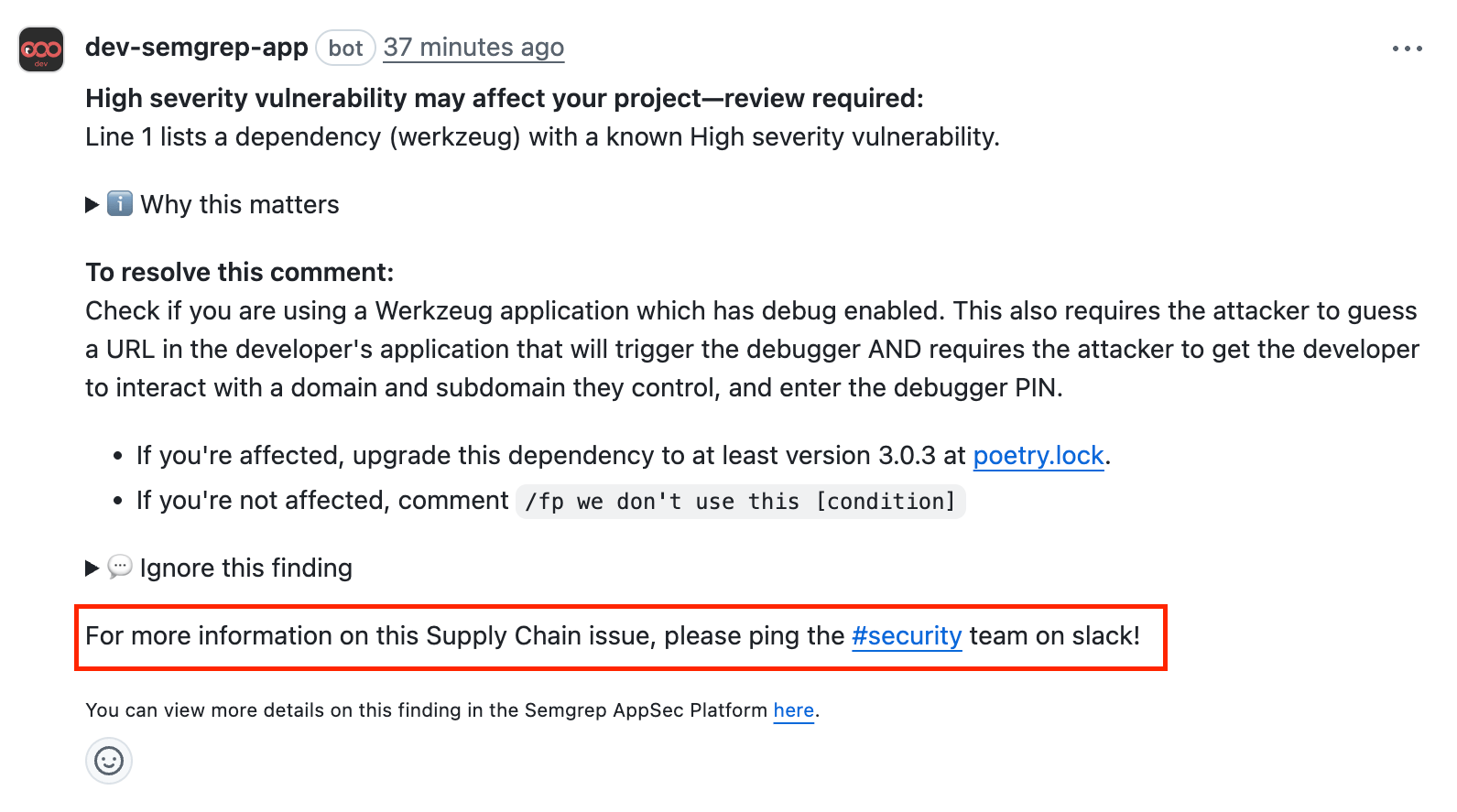 To provide custom PR comments:
Sign in to [ Semgrep AppSec Platform](https://semgrep.dev/login?).
Navigate to **Settings > General > Global**.
Go to the **Custom PR/MR comments footers** section.
To provide custom PR comments:
Sign in to [ Semgrep AppSec Platform](https://semgrep.dev/login?).
Navigate to **Settings > General > Global**.
Go to the **Custom PR/MR comments footers** section.
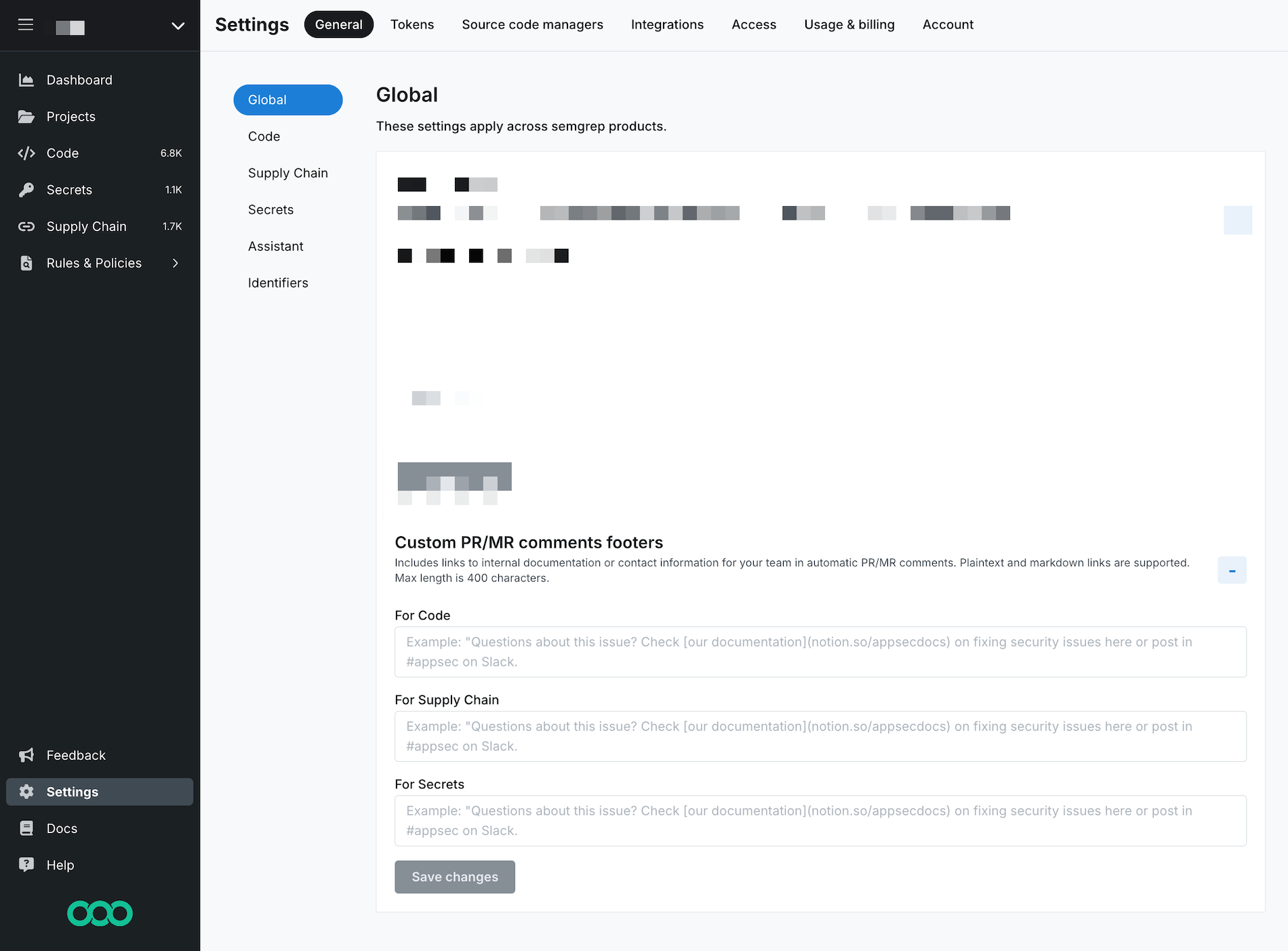 Provide a custom comment for each Semgrep product whose findings you want to generate a PR comment. Semgrep supports HTML, Markdown, and plaintext links in your message.
Click **Save changes**.
## Next steps
You've finished setting up a core deployment of Semgrep 🎉.
* Explore recommended tasks after deployment in [ Beyond core deployment](/deployment/beyond-core-deployment).
## Additional references
Provide a custom comment for each Semgrep product whose findings you want to generate a PR comment. Semgrep supports HTML, Markdown, and plaintext links in your message.
Click **Save changes**.
## Next steps
You've finished setting up a core deployment of Semgrep 🎉.
* Explore recommended tasks after deployment in [ Beyond core deployment](/deployment/beyond-core-deployment).
## Additional references